Renewal evidence, faster drafting, better knowledge access, or less administrative work. The outcome determines which layers matter first.
A reference architecture
The AI-Enabled Law Firm
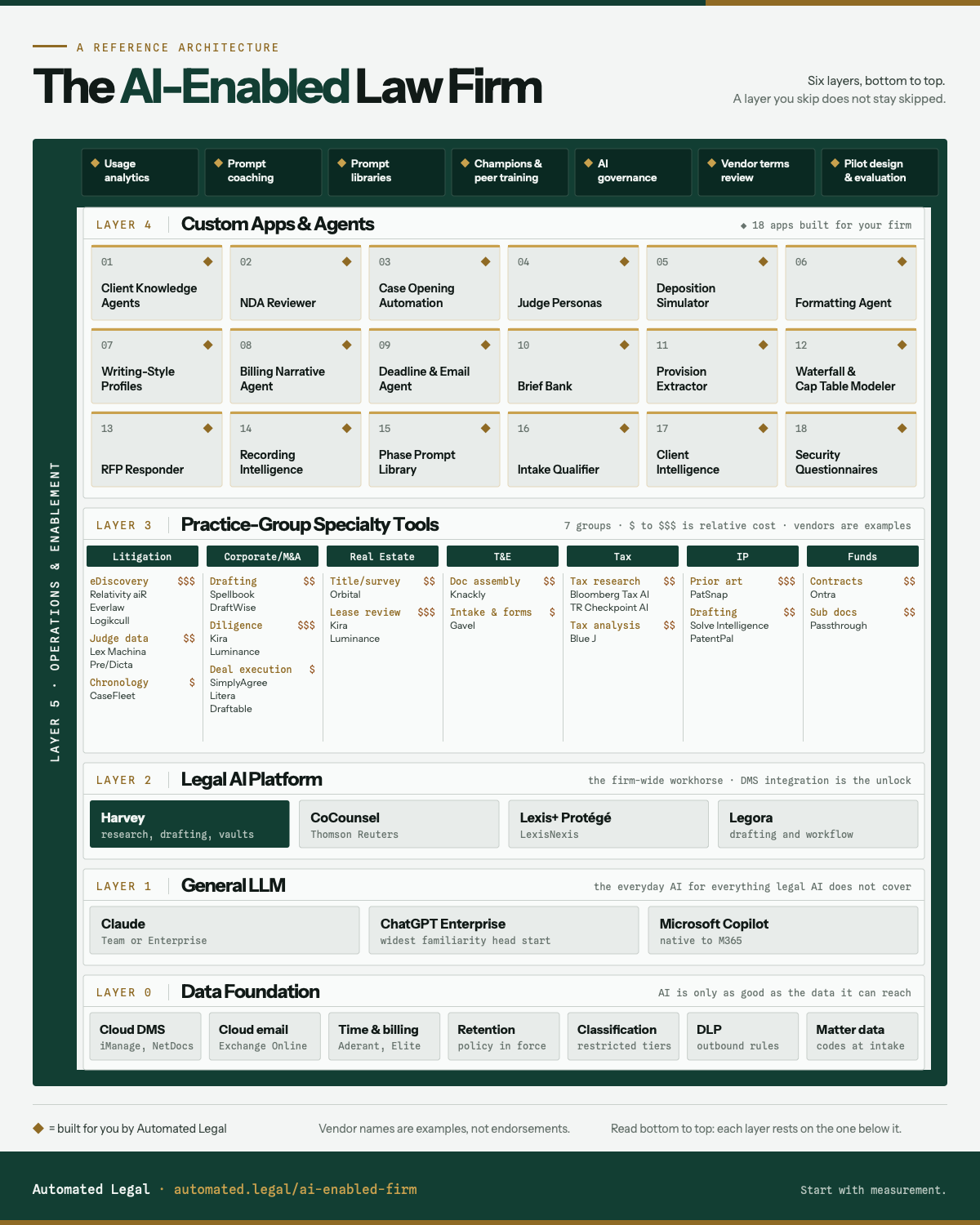
An AI-enabled firm does more than license a legal AI platform. It connects governed data, general AI, legal platforms, practice tools, custom applications, and the people and policies that make them repeatable. Use this map to see what your firm has, what is missing, and what to decide next.
From Automated Legal. Developed through work inside law firms, including analysis of thousands of lawyer prompts. Updated August 24, 2026 · Version 1.3.
Layer 0Data FoundationGoverned, reachable firm data
Layer 1General LLMEveryday AI beyond legal tasks
Layer 2Legal AI PlatformThe firm-wide legal workhorse
Layer 3Practice ToolsSpecialty tools by group
Layer 4Custom AppsWorkflows built for the firm
Layer 5EnablementMeasurement, skill, governance
Layer 0Data FoundationDocuments, email, and billing data, governed and reachable
Layer 1General LLMThe everyday AI for everything else
Layer 2Legal AI PlatformThe firm-wide legal workhorse
Layer 3Practice ToolsSpecialty tools, group by group
Layer 4Custom AppsThe apps a firm builds for itself
Layer 5EnablementMeasurement, skill, and governance
Vendor names are examples. The durable decisions are data access, tool roles, governance, measurement, and ownership.
Measure current usage, pilot against real work, then build one focused application that solves a recurring problem.
A defined engagement
What an architecture review includes
A fixed-scope, paid assessment for firms deciding what to build, buy, integrate, or govern next. Scope and fees are agreed before any firm data is shared.
- Current-state map: your stack, owners, integrations, and active pilots across all six layers.
- Decision analysis: the gaps, overlaps, security constraints, and dependencies affecting the decision in front of you.
- Recommended sequence: a prioritized set of next moves, with the decisions your leadership team still needs to make.
“ACG has been more than an AI advisor to us. They brought the technical and organizational expertise we needed to think through our technology strategy, our team, and how we continue innovating as a firm. They’ve helped us get more value from our AI tools, train our people, and develop custom workflows while building the internal capability to manage and evolve this work ourselves.”
The outcomes · Layer 4
Custom Apps & Agents
Ask a whole case record a question and get a cited answer. Review an NDA in minutes. Pressure-test a brief before you file it. This is the work the rest of the stack exists to produce.
A purchased tool solves the vendor's version of a problem. These are built against a firm's own documents and its own complaints. Some can be prototyped quickly once the layers below are in place. Production use still requires testing, permissions, ownership, and maintenance.
Swipe through the applications
01
Client Knowledge Agents
An agent on a matter's documents, so anyone on the team can query the whole record and get cited answers.
02
NDA Generator / Reviewer
Reviews incoming NDAs against the firm's playbook, identifies potential deviations for lawyer review, and drafts a response.
03
Case Opening Automation
Turns intake notes into a stronger starting draft of the case assessment memo, demand letter, and litigation hold notice for lawyer review.
04
Judicial-Pattern Analysis / Argue-the-Other-Side
Pressure-tests a draft against documented judicial patterns or the other side's best argument before filing.
05
Adversarial Argument Simulation / Deposition Simulator
Simulated questioning for witness preparation and associate training, with lawyer oversight.
06
Document Formatting Agent
Applies a partner's or a court's formatting specification to a draft automatically.
See 12 more applications
07
Partner Writing-Style Profiles
Codifies each partner's structure and phrasing so first drafts arrive in their voice instead of the model's.
08
Timekeeping / Billing Narrative Agent
Reconstructs the day from calendar, email, and document activity, and drafts narratives that comply with client billing guidelines.
09
Matter Deadline / Email Agent
Watches email, calendar, and deadlines across every active matter and surfaces what is due, unanswered, or quietly drifting.
10
Firm Brief Bank / Precedent Vault
Makes prior work product searchable behind a confidentiality screen, so drafting starts from the firm's best previous version. Usually the cheapest high-value build on this list.
11
Contract Provision Extractor
Pulls the provisions that matter (venue, arbitration, fee-shifting) from any incoming contract into one scannable view.
12
Distribution Waterfall / Cap Table Modeler
Extracts economic terms from operative documents and models the distributions and ownership.
13
Experience Database / RFP Responder
Makes firm experience searchable by industry, deal type, and outcome, and drafts pitches with real matter citations.
14
Interview / Recording Intelligence
Mines recordings and transcripts for admissions, inconsistencies, and timeline conflicts, cited to the source.
15
Prompt Library by Litigation Phase
The firm's playbook organized the way lawyers think: by phase of the case, not by feature of the software.
16
Client Intake Qualifier
Screens inbound matters against the firm's intake criteria before an attorney spends time on them.
17
Competitive / Client Intelligence Agent
Monitors clients, prospects, and their markets, and delivers the developments worth a partner's call.
18
Security Questionnaire Responder
Drafts responses to 200-item client security audits from the firm's own policies and control documentation.
One example
How one knowledge agent uses all six layers
Consider a knowledge agent that answers questions across a large matter file and cites the source. The visible application is Layer 4, but it only works when every layer underneath it has a defined role:
- Documents worth pointing atLayer 0
a governed, retrievable matter file with retention and access rules applied.
- A general model for the supporting workLayer 1
intake summaries, formatting, and the client presentation.
- A legal platform to host itLayer 2
the approved vault and agent tooling where the workflow runs.
- A practice-group tool where one existsLayer 3
the eDiscovery platform used to prepare the record.
- The application itselfLayer 4
an agent configured on the matter's documents and tested by lawyers who can identify unsupported answers.
- People and policies that keep it reliableLayer 5
prompt skill, usage measurement, governance, ownership, and a review process.
Every app above needs the same stack underneath it. That is why this is an architecture and not a shopping list.
Layer 5
Operations & Enablement
What separates the firms getting the outcomes above from the firms just paying for licenses.
Licenses are not usage, usage is not skill, and nothing is governed by default. Layer 5 is not a step in the sequence; it is the discipline that makes the other five layers produce. In LexisNexis's 2025 research, half of lawyers said their organization did not measure AI against clear success metrics. That leaves too many renewal decisions resting on anecdotes rather than evidence.
- Usage analytics across all your LLMs
who uses which tool, how often, and how well, in one place instead of four vendor dashboards. Measurement comes first.
- Personalized prompt coaching
per-lawyer reports built from each lawyer's own prompts. Training rooms do not change behavior; a private report about your own work does.
- Prompt libraries by practice group
the prompts that work, written down and maintained.
- AI champions and peer-led training
a respected lawyer demonstrating a real use case on a real matter, the only format that survives a busy calendar.
- AI governance
acceptable use, disclosure, privilege guardrails, client consent where outside counsel guidelines require it, and a data lifecycle for every tool.
- Vendor terms review
retention windows, human-review carve-outs, and amendment rights, compared before signature.
- Pilot design and vendor evaluation
head-to-heads with written criteria and a decision date, not pilots that quietly run forever.
Start with measurement, because it is the only step that tells you which of the others your firm needs. Automated Legal turns your firm's own AI usage data into a monthly picture: who is using what, how well, and what changed. When you want help building what measurement exposes, that hands-on work is here.
Layers 0–2
The stack underneath
Why the same outcomes succeed at one firm and stall at another usually comes down to these three layers.
- Layer 0 · Data Foundationcloud DMS (iManage Cloud, NetDocuments), cloud email, time and billing systems (Aderant, Elite 3E), retention, classification, DLP, matter data at intake
the layer nobody wants to fund, and the ceiling on everything above it. Much of the disappointment attributed to legal AI is a Layer 0 problem wearing a Layer 2 invoice.
- Layer 1 · General LLMClaude, ChatGPT Enterprise, Microsoft Copilot
the everyday AI for everything legal AI does not cover: spreadsheets, email, formatting, knowledge search, staff productivity. Copilot removes adoption friction inside M365; the spreadsheet-heavy lawyers we work with rate the frontier models stronger. Pick with a head-to-head pilot, not a renewal default.
- Layer 2 · Legal AI PlatformHarvey; CoCounsel, Lexis+ Protégé, and Legora compete for the seat
the firm-wide legal workhorse: research, drafting, vaults, workflows. The unlock is DMS integration, which turns the firm's own work product into something a lawyer can query in plain language. Know the gaps and re-check them quarterly: redlining, footnotes, spreadsheet work, and cross-session memory have improved on paper, and where they still run thin in practice, that is the work Layers 1 and 4 absorb.
Layer 3
Tool catalog by practice group
The tools only one practice group needs, and roughly what each costs.
Layer 2 covers the firm; this layer covers the practice group, and standardization stops being the goal, because a litigation team and a trusts and estates team have almost nothing in common at this layer. The depth is uneven on purpose: litigation and transactional tooling is years ahead of the rest, and the groups you do not see here, employment among them, are served by Layers 2 and 4 today rather than by a weaker vendor. Vendor names are examples of a category, not endorsements, and this is the fastest-moving layer in the stack: treat the category as durable and the vendor as a snapshot. Scroll sideways to read the full table.
| Practice group | Tool (example vendors) | What it does | Cost signal |
|---|---|---|---|
| Litigation | eDiscoveryRelativity aiR, Everlaw; Logikcull at the budget end | AI-assisted review, culling, and privilege screening across large productions | $$$ |
| Litigation | Litigation analytics and judge dataLex Machina, Pre/Dicta | Outcomes, timing, and motion tendencies by judge, court, and opposing firm | $$ |
| Litigation | Chronology and fact managementCaseFleet; CaseMap+ AI if the firm is already on Lexis | A cited fact chronology that keeps the case story linked to the evidence | $ |
| Corporate/M&A | In-Word contract draftingSpellbook, DraftWise | Drafting and clause suggestions inside Word, checked against firm precedent | $$ |
| Corporate/M&A | Due-diligence reviewKira, Luminance | Extracts and classifies provisions across a data room, flagging deviations | $$$ |
| Corporate/M&A | Deal execution and document mechanicsSimplyAgree; Litera, Draftable | Closing checklists and signature pages, plus reliable redline comparison where the legal platform falls short | $ |
| Real Estate | Title, survey, and lease diligenceOrbital | Reads title commitments, surveys, and leases; extracts obligations onto GIS | $$ |
| Real Estate | Lease review at portfolio scaleKira, Luminance | Extracts terms, obligations, and deviations across lease portfolios | $$$ |
| Trusts and Estates | Document assemblyKnackly; replacing legacy HotDocs | Generates estate planning document sets from structured intake | $$ |
| Trusts and Estates | Client intake and formsGavel | Turns firm templates into client-facing intake that generates the document set | $ |
| Tax | Tax research AIBloomberg Tax AI, Thomson Reuters Checkpoint AI | Natural-language research over primary tax authority, with citations | $$ |
| Tax | Tax position analysisBlue J | Models how a tax authority or court would likely treat a position, with the authorities behind the answer | $$ |
| IP | Patent search and landscapingPatSnap | Prior art search, portfolio analysis, and competitive mapping | $$$ |
| IP | AI patent draftingSolve Intelligence, PatentPal | Drafts claims, specifications, and figures for attorney revision | $$ |
| Funds | Private-markets contract automationOntra | High-volume NDAs, side letters, and MFN elections for fund counsel | $$ |
| Funds | Investor onboarding and subscription documentsPassthrough | Electronic sub docs with conditional logic, built with fund formation counsel | $$ |
Costs are relative to a 50 to 300 lawyer firm: $ a practice group can absorb, $$ a budgeted firm decision, $$$ a committee decision, often matter-billed.
Where to start
Measure first. A metadata export can show adoption by role and practice group, unused seats, feature usage, and movement over time. Prompt analysis is a separate, explicitly scoped assessment.
Pilot your general AI and your legal AI platform (Layers 1 and 2); do not default. Same tasks to each tool, criteria written in advance, a decision date on the calendar. Read the enterprise terms during the pilot, not during the renewal.
Build one Layer 4 app that answers a real complaint. The NDAs, the formatting, the brief nobody can find. One working app does more for adoption than any rollout email.
Already using legal AI?
Request a complimentary Adoption Snapshot to see active users, frequency, feature usage, cohorts, and movement.
Request an Adoption SnapshotStill deciding what to build or buy?
Request the fixed-scope, paid architecture review defined above.
Request an architecture reviewDo not email usage exports or prompt data. We agree the minimum data needed and provide secure transfer instructions after scoping.